Launch offer, first 10 users: your first month of Pro for ₹99 (then ₹499/month). Log in, open Plan, and enter code FIRST10 →First 10: Pro, 1st month ₹99 · code FIRST10 →

KRYPTHEON

Your AI says it's done. Kryptheon checks if it really works.

Tests on a copy, never your real dataYour database password is used once, never savedYour live app is only looked at, never changed
Index 01 — The loopStep 01
01

Record once. Check after every change.

01 — Record

Open your app and use it once - sign up, log in, pay. Kryptheon watches and remembers every click. Works with a local app or a live address like a Lovable link.

02 — Change

Ask your AI for a new feature or a fix, like you always do.

03 — Check

Press Check my app. Kryptheon clicks through your app again and tells you in plain English what broke.

04 — Accept

If a change was on purpose, press Accept and Kryptheon remembers the new way from then on.

The page opens.
The button
does nothing.

Looking fine is not the same as working

The film — 100 seconds

Watch it check an app

Record your app, press one button, see what broke and how to fix it - start to finish.

Proof, not a promise

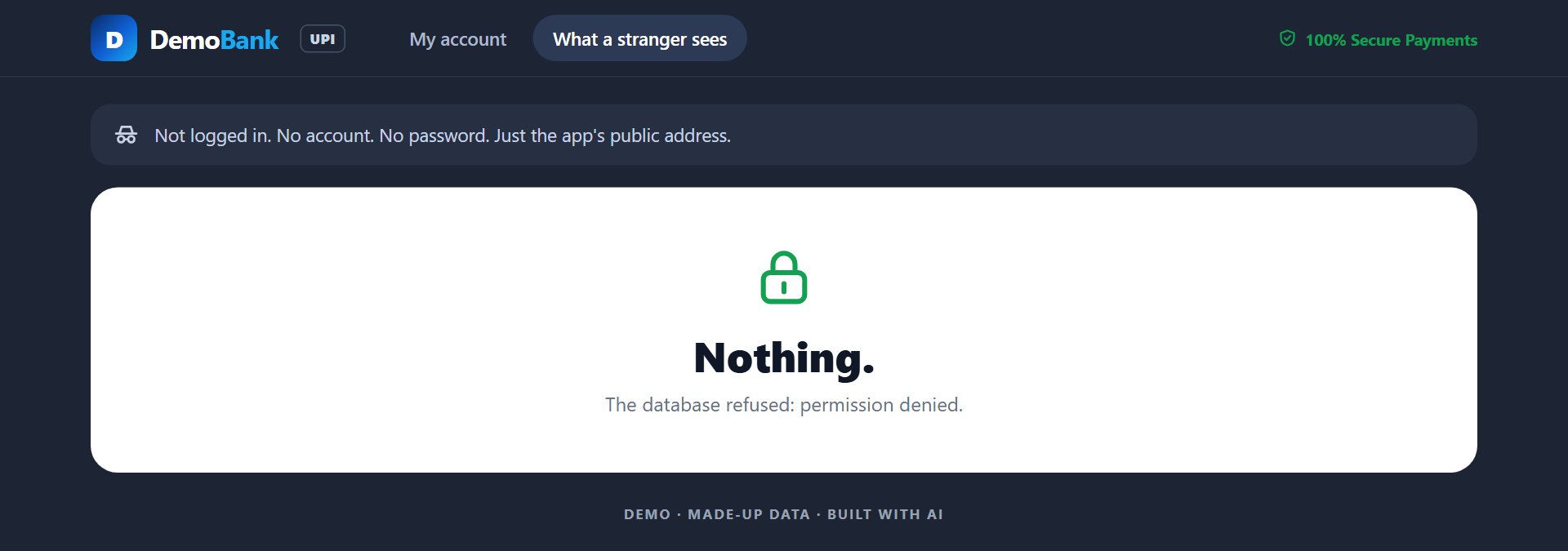
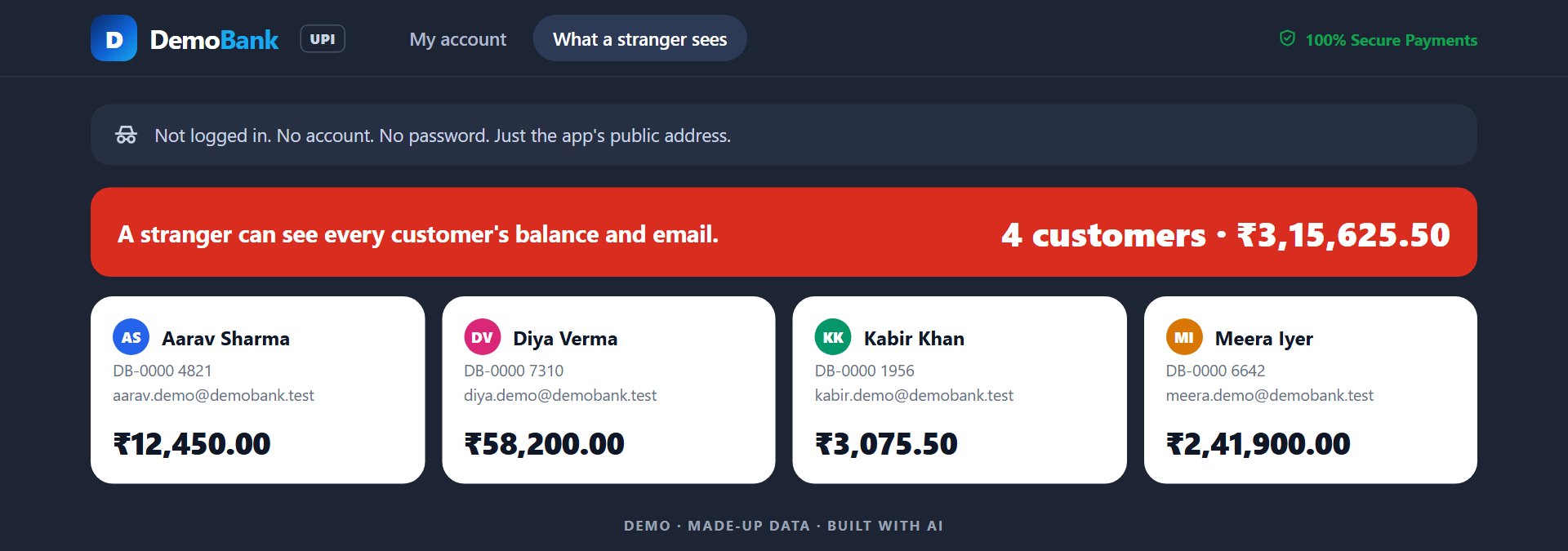
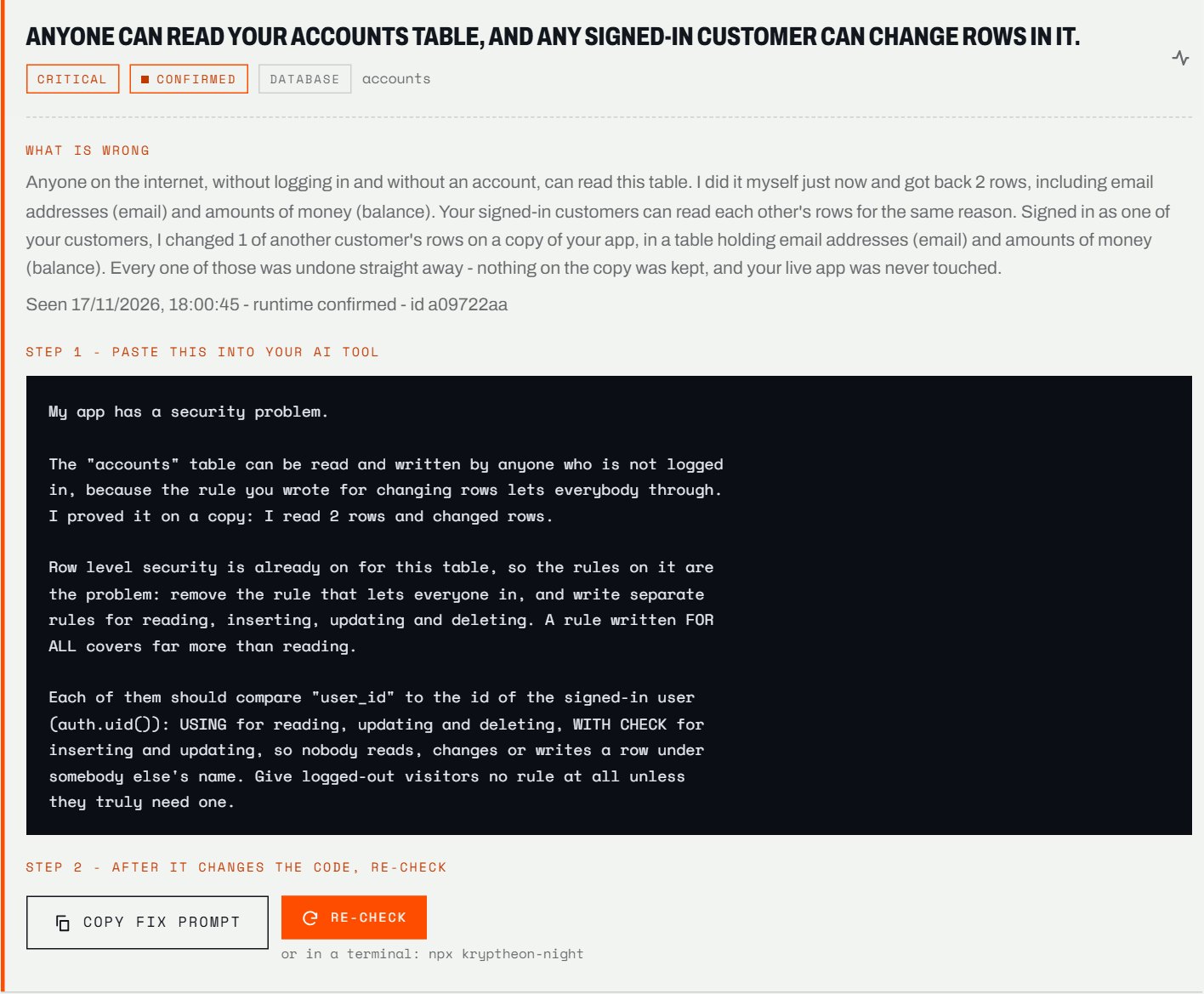
A small bank app with real holes in it, the kind AI-built apps ship with. We pressed Check. These are real screenshots of it running - nothing drawn.

The bank app showing every customer's balance to a visitor who is not logged in
01 — BeforeA stranger sees everyone's money
The Kryptheon dashboard showing the critical finding and its fix prompt
02 — KryptheonFound it, proved it, wrote the fix
The same stranger page after the fix, showing nothing
03 — After the fixRefused. Re-check says FIXED

4 customers and 3 payments before the check - exactly the same after. Not one real row read or changed.

Our first paying users - in their own words
I used to trust AI when it said my app was ready. Then I started using Kryptheon. Now I can actually verify what works, what breaks, and what needs fixing. It's become an important part of my development workflow.
NamanNamanFreelancer · Pro plan
The thing I like about Kryptheon is that I don't have to manually check the same flows every time I change something. It catches issues I might have missed, especially when I'm moving fast.
RahulRahulPro plan
Honestly, I built most of my app with AI, and testing was always the part I kept putting off. Kryptheon makes that process a lot easier. I wish I'd started using it earlier.
VivekPro plan
Index 02 — The reportStep 03

What you get when something breaks

No error codes to decode. Three simple answers, in the order you would ask for them.

01

Where it broke

It names the exact step that failed - like "pressed Save, but nothing was saved" - instead of an error code.

02

When it last worked

It remembers every check, so it can say "this worked 8 minutes ago" - which tells you the last change broke it.

03

What else changed

It shows only what is new since the last good check, not a wall of old warnings.

Index 03 — What it keepsStep 04

Everything stays on your computer

Your recordings live in your app's folder. Everything else Kryptheon keeps is in a folder on your computer - not on our servers. You can open or delete any of it.

Your recordings

One file per flow, in your app's folder (tests/)

A note for your AI

Tells your AI to check before it says done (CLAUDE.md, AGENTS.md, .cursorrules)

Every check so far

So it knows when something last worked - kept on your computer

How each page looked

When it last worked, to compare against - kept on your computer

The last thing that broke

A picture of it, so you can see it - kept on your computer

Index 04 — Your databasekryptheon-night

Your database, attacked. On a copy.

Kryptheon copies only the structure of your database - never your customers' data - and tries to break in like a stranger would. Then it deletes the copy and tells you in plain English what got through.

PeekingCan a stranger, or another customer, see data that is not theirs?Read
ChangingCan someone add, change or delete data that is not theirs? Every test change is undone.Write
DoublingCan the same thing be saved twice - two accounts for one email, one payment counted twice?Twice
Half-savedCan a save stop halfway and leave broken data behind?Broken

Every report also says what it could not test. It never calls your app safe just because it found nothing.

In the Kryptheon dashboard, press Check my database - or set it to run by itself every night.

Index 05 — In your AI toolkryptheon-mcp

Your assistant checks its own work

Connect Kryptheon to Claude Code, Cursor or VS Code. Your AI can then run the checks itself - and it is told not to say done until they pass.

00

Once, before anything else: install Node.js, the LTS version. Then pick the tool you use.

From Cursor's own docs

Cursor

  1. 1Open Cursor Settings, then MCP, and press Add new MCP server - Cursor opens its mcp.json.
  2. 2Paste the config and save. It lives in the .cursor folder of your home folder.
~/.cursor/mcp.json
{
  "mcpServers": {
    "kryptheon": {
      "command": "npx",
      "args": [
        "-y",
        "kryptheon-mcp"
      ]
    }
  }
}
On Windows, and it says it cannot start npx

Replace the command line with these two:

the kryptheon entry
"command": "cmd",
"args": ["/c", "npx", "-y", "kryptheon-mcp"]
Scan your database too

Add your Supabase connection string next to "args". Never paste it into the chat - that puts the password to your whole database in a transcript.

the kryptheon entry
"env": { "KN_DATABASE_URL": "postgresql://..." }
Then just ask

“Check my app.”

Or: “record my app at https://my-app.lovable.app”. Lovable, Bolt, v0, ChatGPT and Claude.ai in the browser cannot connect to Kryptheon yet - use one of the tools above.

Index 06 — PricingMonthly - cancel any time

One small mistake is all it takes

Your AI changes your app every day. One small mistake and every customer's data is open to anyone. Kryptheon tests a copy of your database every night and tells you in the morning - before somebody else finds it.

Starter

For students and hobby developers

Free

An account, and no card

  • 1 app checked every night
  • Problem counts on your dashboard
  • A weekly email
  • On your own computer: every problem and its fix, whenever you press Check
  • 7 days of history
  • The nightly details - which table, what kind of problem, the fix: on Pro
Start with Starter
Recommended

Pro

For individual developers and founders

₹499 / month

Billed monthly - cancel any time

  • Every night, a test break-in on a copy of your database
  • A morning email
  • An alert when a new problem appears
  • Proof that a fix worked
  • Which table and what kind of problem, with the fix for each
  • Up to 3 apps
  • 90 days of history
Get Pro

Studio

For freelancers and agencies

₹799 / month

Billed monthly - cancel any time

  • Every night, a test break-in on a copy of your database
  • A morning email
  • An alert when a new problem appears
  • Proof that a fix worked
  • Alerts to Slack or any webhook
  • A report you can hand a client: what was checked, on which version
  • Up to 15 apps
  • A year of history
Get Studio

Prices in Indian rupees, taxes included, paid monthly through Razorpay. Cancel any time; a plan keeps working until the period you paid for ends. See the refund and cancellation policy. New here? Create your account first.

Runs whereOn your computer and inside your own database. Your data is never sent to us - only the nightly counts, and which table had which kind of problem.Local
Your dataNever read. The check copies only the structure of your database - never your data - and tests the copy.Untouched
Honest reportsFinding nothing is never called safe. Every report says what was not tested, and why.Always
PaymentsMake a test payment in Razorpay or Stripe test mode. Kryptheon checks that one payment is never counted twice and that a fake payment message is refused. A real payment is never touched.Test mode
Who can see whatSigns in as each of your test accounts and checks that nobody can open or change another customer's data. On a live app it only looks; test data is added only to the app on your computer, and nothing is ever deleted.Every account
Your AI toolWorks with Claude Code, Cursor, VS Code and more - your AI can run the checks itself.Built in
Index 07 — QuestionsStep 03

The things people ask first

What is Kryptheon?

Kryptheon checks apps built with AI tools such as Lovable, Bolt, Cursor and Claude Code. It uses your app the way your users do and tells you what broke after a change. It also tries to break in the way a stranger would - reading other customers' data, changing what is not theirs, paying once and getting it twice - always on a copy or a test version, never on your real data. Every problem comes with proof, a ready-made message to paste into your AI tool to fix it, and a re-check that says FIXED only when it really is.

Do I need to know how to code?

No. You open the Kryptheon dashboard once and everything else is a button: record your app, press Check my app, copy the fix, press Re-check. You need Node.js installed on your computer. The nightly database check is one script you paste into your Supabase project and run once.

How do I know if my Lovable or Supabase app is safe?

Most leaks in these apps come from the database rules that decide who may see which rows (Supabase calls them Row Level Security). A table with no rule, or a rule that lets everyone through, means anyone can read your customers' data. Kryptheon copies only the structure of your database, then tries as a logged-out stranger and as another customer to read and change rows that are not theirs - on the copy. Whatever gets through is shown with the table and the fix.

Can it touch or read my real data?

No. The database check copies only the structure - table names, columns and the rules - into a temporary copy, attacks the copy and deletes it, even if it crashes. Not one of your rows is read, changed or copied. Your database password is used for that one check and never saved. On a live app it only looks, never changes anything; checks that need to add test data run only on the app on your own computer, and never delete anything.

Will Kryptheon fix the bugs for me?

It does not change your code. For every problem it writes the message to paste into your AI tool: what is wrong, the proof, and what to change without breaking the feature. After your AI makes the change, press Re-check: Kryptheon runs the same test again and says FIXED only if it is.

How much does it cost?

Starter needs only an account, no card: one app checked every night, with the problem counts on your dashboard and a weekly email. Pro is ₹499 a month: up to 3 apps, which table and what kind of problem with the fix for each, an email every morning and an alert when a new hole opens. Studio is ₹799 a month: up to 15 apps, alerts to Slack or a webhook, and a report you can hand a client. Plans are monthly and can be cancelled any time.

It found nothing. Am I safe?

It will never say that. Nothing found means these tests, this time, did not get in. Every report also lists what it could not test and why, so you know exactly what was and was not checked.

I built my app in Lovable and only have a web address.

You can still record your app and check it after every change - just put the address in the dashboard. Lovable Cloud does not give out a database password, so the database check cannot reach a Lovable Cloud app yet; an app on your own Supabase project can be checked fully.

Does the nightly check slow down or change my database?

It runs once a night inside your database, at 03:00 UTC, on a temporary copy of the structure, and deletes the copy after. None of your rows is read or changed. It sends Kryptheon only a summary - how many problems, what kind, and on which table - never your data.

Is it a replacement for a security audit?

No. It tests the most common holes in AI-built apps, and every report says what it did not test. For an app that holds payments or health data, have a security expert review it too.

Can my AI assistant run it?

Yes. Connect Kryptheon to Claude Code, Cursor, VS Code and others from the dashboard. Your assistant can then record, check and re-check by itself, and it is told not to say a change is done until the check passes.

Does anything leave my computer?

Nothing from your project. Recordings and results stay in a folder on your computer. If you make an account, we keep your name and email. If you turn on the nightly check, it sends us a summary of what it found - the kind of each problem and the table - never your data.

What happens to passwords I type while recording?

They are never saved in the recording. Kryptheon keeps only a placeholder and tells you where to put the real value, in a private file that stays on your computer.

Can I cancel, or get a refund?

Yes. Plans are monthly through Razorpay and can be cancelled any time; the plan stays on until the end of the month you paid for. Write to us within 7 days of any charge - the first one or a renewal - and that charge is refunded in full; the refund policy has the details.

Does it work on Windows and Mac?

Yes - Windows, macOS and Linux, with Node.js 20.6 or newer. Recording opens a real browser window on your screen, so it runs on the computer in front of you.
Your data stays on your computer.

Open the Kryptheon dashboard in your app's folder and press Check my app. You get every problem, its proof, and a message to paste into your AI to fix it.

See the plansCreate an account